
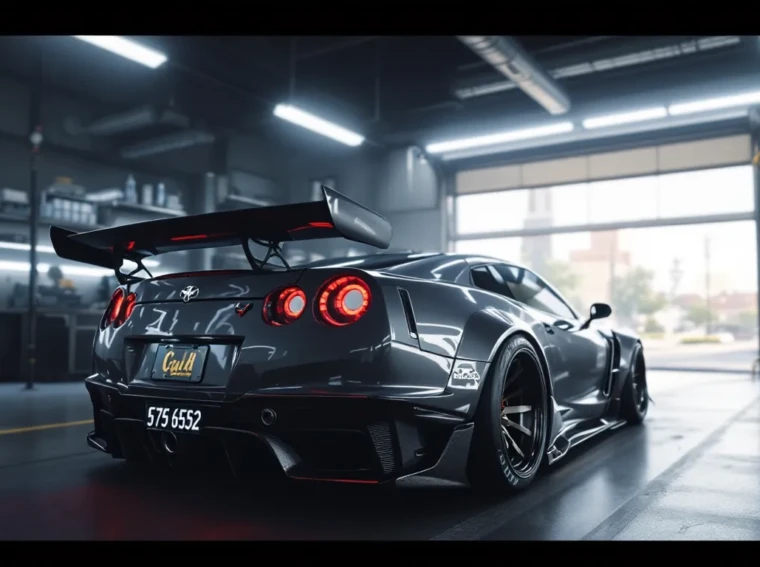
License plates in GTA 5 are more than just a cosmetic detail, they’re a way to personalize your vehicle and make it truly yours. Whether you’re cruising through Los Santos in a tricked-out supercar or a beat-up delivery van, the ability to customize your license plate adds another layer of character to your ride. From slapping on GTA 5 custom plates that match your crew’s vibe to creating something that’ll make other players do a double take, there’s real depth to this feature that many players overlook. This guide covers everything you need to know about changing and customizing license plates in GTA 5, including the exact steps, all available options, workarounds for common issues, and what the system actually lets you get away with.
Key Takeaways
- License plates in GTA 5 support up to eight alphanumeric characters and persist on your vehicle across sessions, serving as a personalization feature that other players can see in multiplayer.
- Customize your GTA 5 license plate by visiting any Los Santos Customs location with your personal vehicle, then select the plate customization option to modify text, colors, and designs.
- The content filter blocks profanity, offensive terms, and reserved brand names on license plates, so keep your plate text clean and creative within community guidelines.
- Create memorable license plates by keeping text short and punchy, using numbers strategically to replace letters, and incorporating crew affiliations or inside jokes that enhance your vehicle’s identity.
- Gold and platinum plate options offer premium cosmetic upgrades that match luxury vehicles, while standard color variations like black, red, and blue allow customization without mechanical advantage.
- If your custom license plate doesn’t save properly, revisit the mod shop to reapply it or switch multiplayer sessions to force a server sync with the latest changes.
What Are License Plates In GTA 5?
License plates in GTA 5 serve as vehicle identifiers that display custom text and styling. Unlike real-world plates where you’re stuck with your registration number, GTA 5 lets you completely personalize what appears on your car’s back end. Each plate can display up to eight characters (depending on the format), and the customization goes beyond just text, you can adjust colors, styles, and designs to match your aesthetic.
These plates are visible to other players in multiplayer sessions, making them a form of self-expression. Your plate persists on the vehicle as long as you own it, even after you log out and return. Many players use plates to rep their crew, display inside jokes, or simply create something that looks clean. The system has been part of GTA Online since its launch and received various updates over the years to expand customization options.
How To Access The License Plate Customization Feature
Requirements And Prerequisites
Before you can customize your license plate, you need to own a personal vehicle in GTA Online. You can’t customize plates on stolen cars or random NPCs’ vehicles, it has to be registered to your character. You’ll also need to own an apartment, garage, or arcade with vehicle storage, though the actual customization happens at specific locations rather than your property.
The feature is available on all platforms: **PC, PlayStation 4, PlayStation 5, Xbox One, and Xbox Series X
|
S**. There are no character level requirements or unlocks needed, once you have a personal vehicle, you’re ready to go.
Step-By-Step Access Guide
-
Locate a Mod Shop: Drive to any Los Santos Customs location on your map. These are scattered throughout the map and marked with a wrench icon. You can visit LSC in Del Perro, Downtown, or several other districts.
-
Enter With Your Vehicle: Make sure you’re driving your own car, not a stolen one. Pull into the mod shop and the interaction prompt will appear automatically.
-
Navigate The Menu: Once inside, look for the “License Plate” or “Plate Customization” option in the main customization menu. It’s usually grouped with paint jobs and other visual mods.
-
Select Your Current Vehicle: If you have multiple vehicles in your garage, the system should prompt you to confirm which car you want to modify.
-
Access The Plate Editor: From here, you’ll enter the customization interface where you can adjust text, colors, and designs. The menu structure is straightforward, though the exact layout varies slightly depending on whether you’re on console or PC.
License Plate Types And Options Available
Standard Letter And Number Combinations
The most basic option is the standard format, which displays letters and numbers in a classic style. The plate accepts alphanumeric input, any combination of A-Z and 0-9 up to eight characters total. This is what the vast majority of players use, and it’s the simplest to set up and remember. You can create something like “BALLIN88” or “CHILL420” without hitting any filters.
These standard plates come in the default white and blue color scheme that mimics real-world license plates, though you can modify the colors once you’re in the customization menu.
Custom Text And Special Characters
Beyond the basic alphanumeric setup, GTA 5 allows certain special characters depending on your region and game version. You might be able to use hyphens, apostrophes, or other punctuation marks, though the availability varies. The character limit of eight still applies, so “JOHN-DOE” counts as eight characters and would exceed the limit.
Custom text options give you flexibility to get creative. Some players combine numbers and letters strategically, like “2THAGAME” or “HUSTLER1”, to convey personality while staying within restrictions. The real limitation isn’t creativity but the content moderation system, which we’ll cover in the restrictions section.
Regional And Faction-Specific Plates
Depending on your game region and GTA Online session settings, certain faction-specific plate designs might be available. Some crew-themed plates or limited-edition styles appear during specific events or updates. These don’t change the text rules, but they do offer unique visual designs beyond the standard look.
Regional variations exist too. Players in different countries might see slightly different default styling or available colors, though the core customization system remains identical.
Customizing Your License Plate: A Complete Walkthrough
Choosing Your Desired Text And Format
When you’re in the license plate editor, the first thing you’ll see is a text input field. Type exactly what you want on your plate, eight characters maximum. Test it mentally before confirming: does it look good, read clearly, and make sense?
Think about spacing and readability. Some character combinations are harder to read at a distance. “I11I” (letter-I, number-one) can look confusing, while “IL0L” (mix of letters and zero) might frustrate other players trying to remember your plate. The cleaner and more legible your choice, the better the payoff.
You can also select from pre-designed plate formats if they’re available. Some of these have themed styling or special borders that add visual flair beyond just changing the text color.
Saving And Applying Your Custom Plate
Once you’ve typed your text and selected your preferred colors or design, you’ll see a “Apply” or “Confirm” button. Hit it, and the plate is immediately assigned to your vehicle. The change is permanent until you decide to modify it again, there’s no cost associated with changing your plate, so you can swap it as often as you want.
The plate saves to your vehicle’s profile, not your account. If you sell the car, the plate goes with it. If you want the same plate on a different vehicle, you’ll need to manually recreate it at the mod shop.
Tips For Creating Memorable Plates
Keep it short and punchy. Eight characters isn’t much, so every letter counts. Avoid overcomplicating, something like “PLAYER1” is instantly memorable, while “XxXGAMER420XxX” wastes precious character space.
Use numbers strategically to replace letters where it makes sense. “KINGP1N” (P1N instead of PIN) keeps it readable while adding style. Numbers can also represent years, crew counts, or personal references that other players won’t immediately clock.
Consider inside jokes or crew affiliations. If you run with a crew, a plate might reference the crew name or a running gag. “SUM1GETS1T” (someone gets it) works as an inside reference while staying clean for the content filter. These plates often spark conversations with other players who recognize the reference.
Advanced Customization: Colors, Styles, And Designs
Color Variations And Themes
Beyond the default white plate with blue stripe, GTA 5 offers multiple color schemes. You can choose from gold, black, red, green, blue, and other accent colors. The color customization applies to the text, background, or the entire plate depending on the style.
Some combinations look sharp: others don’t. A black plate with white text reads clearly from a distance, while neon green text on a neon background might be unreadable. Test your color choice by looking at it in-game from a normal distance before finalizing.
The available color palettes expand slightly with game updates and seasonal events. During certain limited-time events, exclusive color schemes might unlock temporarily.
Gold And Platinum Plates
Gold and platinum plates are premium cosmetic options that stand out visually. These are rarer in Los Santos and catch attention immediately, if you see a player with a full gold setup, they’ve put thought into their customization.
Gold plates work best with specific vehicle colors. A gold plate on a gold car looks cohesive: a gold plate on a lime green car might clash. The same applies to platinum, it’s a sleek, minimalist choice that suits luxury vehicles better than beaters.
These plates don’t offer mechanical advantages: they’re purely cosmetic. But in a game where appearance matters for crew recognition and street cred, they’re worth considering if you’ve got a vehicle worth the investment.
Personalized Designs And Badges
Certain vehicles allow badge placement or custom emblems on the plate. This is less common but appears on specific car types or during themed events. A badge might be your crew symbol, a faction emblem, or a custom design related to the vehicle’s role.
These personalized designs are usually limited to specific vehicles or event periods, so don’t expect them to be universally available. When they are available, they add a layer of identity that text alone can’t achieve.
Common Issues And Troubleshooting
Plate Changes Not Saving
Occasionally, you’ll customize a plate, confirm the change, and log back in to find it’s reverted to default or a previous version. This happens because the plate change didn’t sync properly with Rockstar’s servers. Solution: Head back to the mod shop and redo the customization. Make sure you’re in a stable session with a solid connection before saving. If it keeps reverting, wait a few minutes before logging back in, sometimes the save just needs time to process.
Alternatively, try switching sessions (go into a different lobby and return) to force a server sync. This usually resolves the issue without requiring you to customize again.
Text Restrictions And Character Limits
You’ll hit character limits if you try to use more than eight characters. The system will warn you before confirming, so you can’t accidentally over-extend. But, some players report that certain special characters don’t work as expected, they either get filtered out or display as question marks.
The content moderation system is strict about profanity and offensive content. If you try to create a plate with banned words or phrases, the system rejects it immediately with no error message, just a “invalid” notification. Workarounds like number substitution (for example, “4SS” for profanity) are sometimes caught, sometimes not, Rockstar’s filter isn’t perfect, but it’s comprehensive enough that obvious attempts fail.
Resetting To Default Plates
If you want to remove your custom plate and return to the default look, you don’t have to do anything special. Just visit the mod shop again, clear your custom text, and apply a blank or default plate. The system will automatically assign a random default plate number to your vehicle, and you’re back to standard.
There’s no penalty for resetting, and you can customize again whenever you want.
License Plate Restrictions And Rules
Profanity Filters And Content Policies
Rockstar Games enforces strict content policies on license plates because they’re visible to all players in public sessions. This means anything offensive, slurs, excessive profanity, sexual references, or hate speech, gets rejected instantly. The system doesn’t allow spaces, so you can’t add padding to obscure intent either.
The filter works on multiple levels. Some banned words are obvious: others are contextual. “KILL” might pass in one context but fail in another depending on how it’s framed. To stay safe, assume anything you’d hesitate to say in a voice chat with random players won’t pass the filter.
Reserved Terms And Banned Plates
Certain terms are reserved by Rockstar and can’t be used on custom plates. These typically include brand names, trademark terms, or phrases tied to specific in-game factions or properties. You can’t create a plate that impersonates a Rockstar Games franchise, crew affiliation, or official faction.
Some plates are literally banned, if someone else reported your plate as offensive or if it became a known exploit, Rockstar might blacklist that specific combination. If your plate suddenly disappears after using it for a while, it’s likely been flagged and removed. The solution is simply creating a new plate.
Players can also report your plate directly in-game, which flags it for review. Multiple reports speed up the review process, so if your plate is borderline, be aware it might get removed. The system isn’t foolproof, some questionable plates slip through while harmless ones occasionally get caught, but the intent is to keep the shared multiplayer space clean.
Conclusion
License plate customization in GTA 5 is a straightforward feature with surprising depth if you want to get creative. The core process, visiting a mod shop, entering your text, choosing colors, and confirming, takes less than a minute. But the real value comes from thinking about what plate represents you and your playstyle.
Whether you’re repping a crew, making an inside joke, or just creating something that looks clean on your favorite car, the plate becomes part of your vehicle’s identity. It’s how other players remember your ride in a city full of custom cars. The restrictions exist to keep the community space respectful, but within those boundaries, there’s plenty of room for personality.
For deeper dives into GTA 5 customization and guides, communities like Nexus Mods host extensive modding resources and player-created tools that extend customization far beyond what the base game offers. If you’re looking for broader coverage of GTA 5 updates and features, IGN’s guides section regularly publishes walkthroughs and breakdowns of new customization options added with each patch. For news on the latest GTA Online changes affecting gameplay and cosmetics, DualShockers covers multi-platform releases with up-to-date information.
Now get into that mod shop and create something that makes your ride unmistakably yours.